TEMPLATES
Create Template with AI
AI Template Generation: Quick Start Guide
MCNE uses a Open AI 4th generation model which is secured, token based assuring data confidentiality according to Azure model.
Follow these four simple steps to quickly build and populate your template using our AI tool:
1. Complete Mandatory Fields
Start by filling in all the required fields with the specific information relevant to your template. This ensures the system has the foundational data it needs.
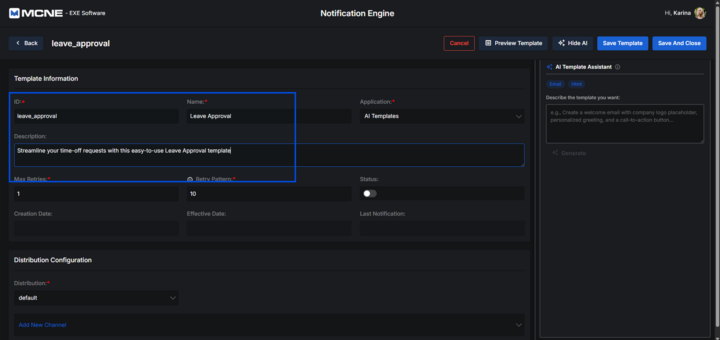
2. Save the Template and Prompt the AI
Once your data is entered, save your progress. Next, provide the AI with a clear and descriptive prompt, instructing it on exactly what kind of content you need it to write for you.
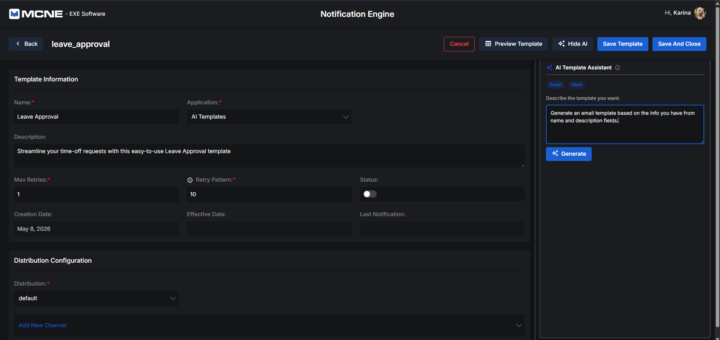
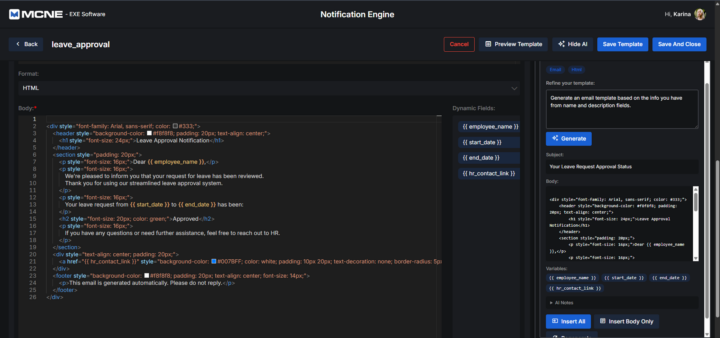
3. Generate and Insert
Trigger the AI to create the content based on your prompt. Once the text is generated and you are satisfied with it, insert it directly into your template.
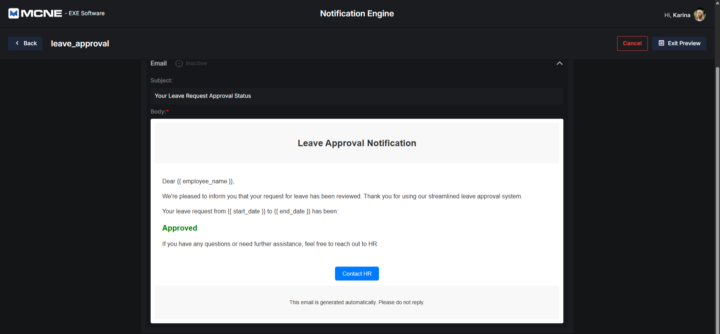
4. Preview
Finally, open the preview mode to review the entire document. This allows you to check the formatting, verify the AI-generated text in context, and ensure everything looks exactly as intended before finalizing.